
2. The character
A cube is a fine start, but a game needs its own meshes, and those come from files. In this chapter, you load Pip from a file and draw it on the ground. You use:
- the
LoadCommand, which loads the files of a Pack, - the
loadedcall, which gets the mesh ids, - the Manifest, which gives each name its id.
This chapter starts from your app from
1. A window, a camera and a cube. The full app is
examples/tutorial/02-character/main.roc.
To see every change, compare the two chapter apps:
git diff --no-index examples/tutorial/01-window/main.roc examples/tutorial/02-character/main.rocThe header stays the same:
app [init, launch, loaded, step, view] { cam: "https://github.com/Pixelsprout/rocco-engine/releases/download/v0.6.0/camera-QiJqL4WFPQGUbBCMZ5bzjdLHhgRz7BiUw1ngwxWwHtP.tar.zst", mesh: "https://github.com/Pixelsprout/rocco-engine/releases/download/v0.6.0/mesh-5Fmg6uFHADmSBmZxNWDg25VStK6mU7YqhkWEXHjMEGNP.tar.zst", pf: platform "https://github.com/Pixelsprout/rocco-engine/releases/download/v0.6.0/platform-2gvPTPztQ7D8yQsMvRTD4rBKS8VmSwMCPZ432eWzNNtJ.tar.zst", roc: "nightly-2026-10-11-7d256b9" }Get the mesh file
Pip is a binary glTF file, pip.glb.
- Make the folder
pip/assets/meshes/. - Download
pip.glb. - Put it in
pip/assets/meshes/.
The host looks for the assets folder next to main.roc. A mesh takes the
name of its file stem, so pip.glb is pip.
Assets and Packs shows where each kind of asset goes.
If you are curious, Pip comes from a Blender script:
examples/tutorial/source/make_meshes.py.
The Model
Change the Model. The cube becomes the ground, and Pip gets its own mesh id:
# pip is 0, the fallback mesh, until loaded gives its id.
Model : { ground : U32, pip : U32 }
Load the Pack
A Pack is a named set of assets that load together. Your game asks for a
Pack with the Load Command. Change init, and fill in loaded:
init : Vocabulary.Config -> { model : Model, commands : List(Command) }
init = |_config| {
	model = { ground: Mesh.primitive(Cube), pip: 0 }
	{ model, commands: [Load({ pack: "pip", assets: ["pip"] })] }
}

loaded : Model, Str, Manifest -> Model
loaded = |model, _pack, manifest| { ..model, pip: Mesh.resolve(manifest, "pip") }
The host runs the Load right after init returns:
- The host loads
pip.glb. - The host calls
loadedwith the pack name"pip"and the Manifest. - The host calls
viewwith the Model thatloadedreturned.
So the first view already has Pip’s id.
The Manifest lists each name that the Load asked for, with its id.
Mesh.resolve finds a name in the Manifest. Call it in loaded and keep
the id in the Model, rather than looking up names in view.
If the file is missing, its name gets id 0. Id 0 is the fallback mesh, a magenta cube, so a misspelt name shows up on the screen and the game keeps running.
view
Draw the cube as a flat ground, and draw Pip on top of it:
view : Model -> Vocabulary.Scene
view = |model| {
	ground = { ..Draw.default, id: 1, mesh: model.ground, pos: { x: 0.0, y: -0.1, z: 0.0 }, scale: { x: 6.0, y: 0.2, z: 6.0 }, tint: { r: 0.12, g: 0.25, b: 0.1 } }
	pip = { ..Draw.default, id: 2, mesh: model.pip }
	camera = Cam.look_at({ x: 0.0, y: 1.4, z: 2.6 }, { x: 0.0, y: 0.5, z: 0.0 })
	{ ..Scene.empty, camera, nodes: [Light(sky_light), Light(sunlight), Draw(ground), Draw(pip)] }
}- The ground is the cube, scaled to 6 units wide and 0.2 units high. Its top is at y 0.
- Pip stands on y 0 and faces
+z, toward the camera. Pip is about 1.1 units tall. Its colours come from the file, so it keeps the white tint ofDraw.default. - Each Draw has its own id. Keep the id of a thing the same from one step to the next. The Scene explains why.
nodesholds the lights from chapter 1, then the ground and Pip.- The camera moves closer and looks at the middle of Pip.
Test the calls
Each call is a plain function, so roc test can test it. Add
import pf.Config below the other imports. Config.empty gives you a
Config for tests. Then add these tests at the bottom of the file:
expect init(Config.empty).commands == [Load({ pack: "pip", assets: ["pip"] })]

expect {
	model = loaded(init(Config.empty).model, "pip", [{ name: "pip", id: 4, duration: 0.0, clips: [] }])
	model.pip == 4
}
The second test gives loaded a Manifest where pip has id 4, and checks
that the Model keeps that id. Run the tests:
roc test main.rocRun the game
In pip/, run:
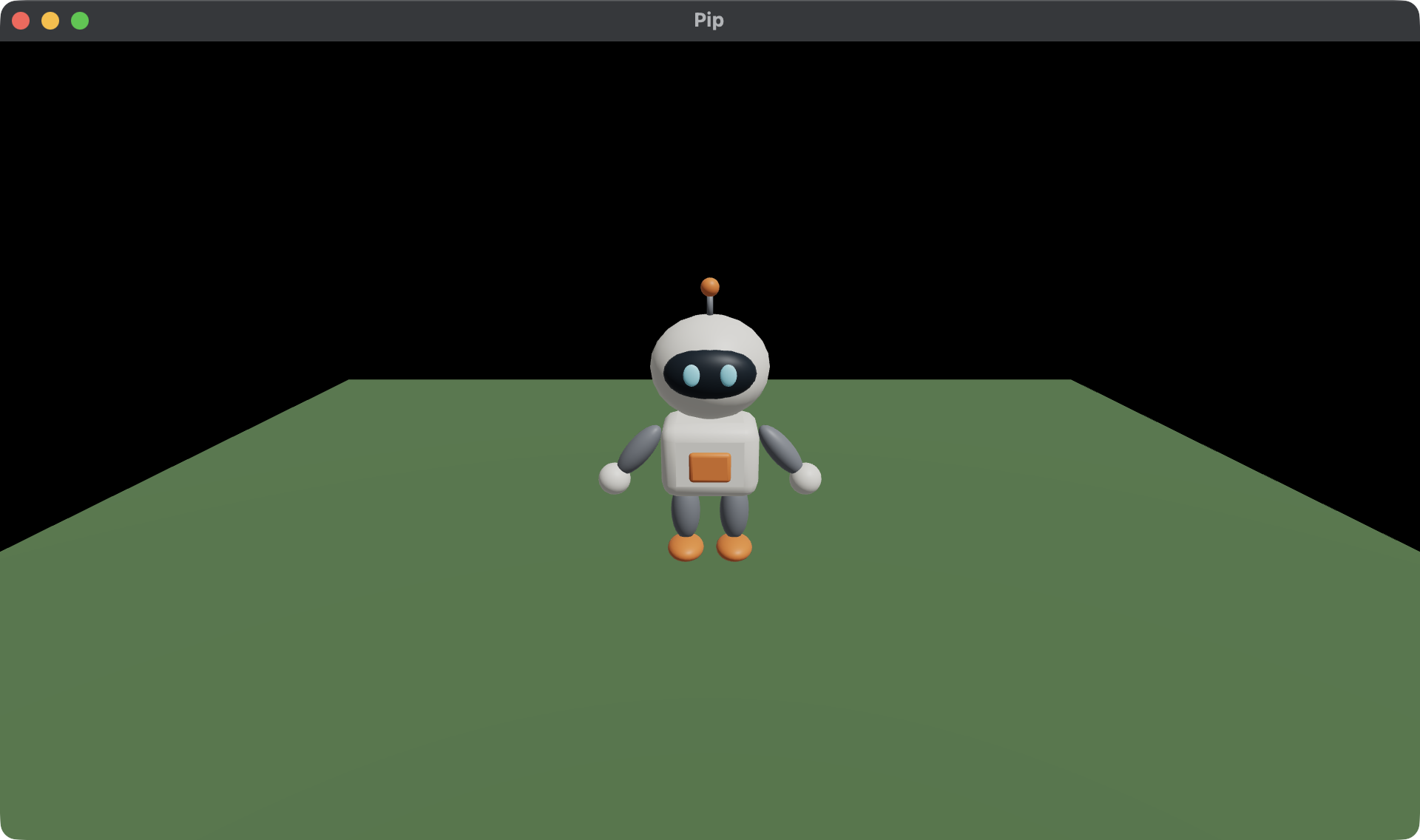
roc main.rocPip stands in the middle of a green ground. If you see a magenta cube
instead, check that the file is at pip/assets/meshes/pip.glb.
Next, read 3. Moving, where you make Pip walk with the keys.