
4. Lights, a sun and its shadow
Pip walks, but it looks pasted onto the ground, because nothing in the game casts a shadow. A shadow shows where a thing stands. In this chapter, you change the lights so that Pip casts one. You use:
- an ambient light, which lights every side a little,
- the sun, the one light that casts a shadow.
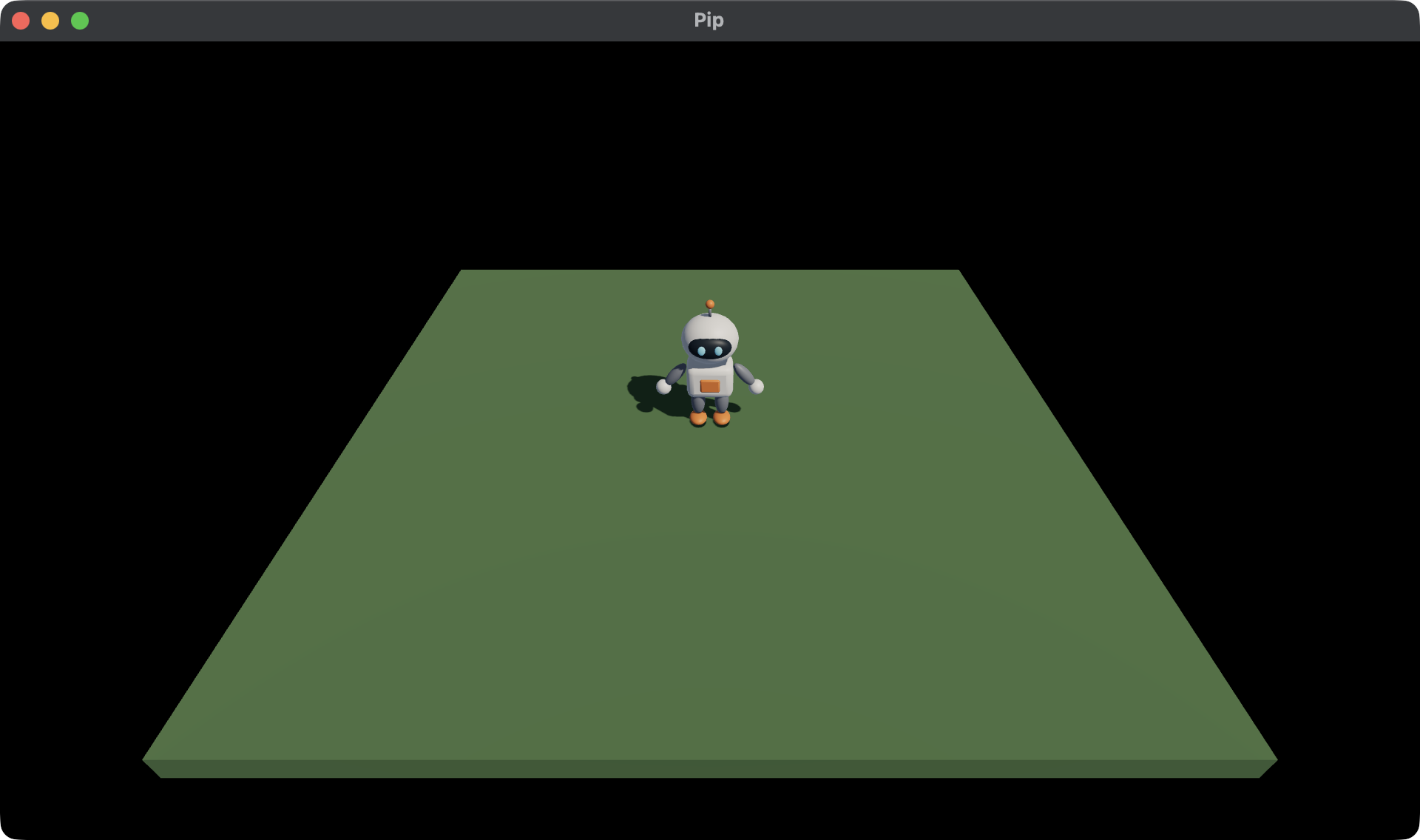
The editor starts with your app from 3. Moving. If you get lost, press Show answer to see the full app of this chapter.
The imports and pip.glb stay the same, and so does the header:
app [init, launch, loaded, step, view] { cam: "https://github.com/Pixelsprout/rocco-engine/releases/download/v0.16.0/camera-HVUJTSKzVcZVjTnxuZPa9hMFU65JwXUY14vqCGmk2f3p.tar.zst", linalg: "https://github.com/Pixelsprout/rocco-engine/releases/download/v0.16.0/linalg-91nNeJnp8hDsifhs6y1vmjLwQ3n5DPnfWtv6KvdVh8cv.tar.zst", mesh: "https://github.com/Pixelsprout/rocco-engine/releases/download/v0.16.0/mesh-7zFcKD4YWLEtnKqeAVRi6GH7zXKgL9fpVyzf4SdAx12y.tar.zst", pf: platform "https://github.com/Pixelsprout/rocco-engine/releases/download/v0.16.0/platform-7dtsuSpabi2sAHN4AKwgRzJjpBNfD6gsWkPJ4PWpZf5D.tar.zst", roc: "0.1.0-rc1" }Only the lights change.
The lights
Replace sky_light and sunlight with these two values:
# A cool sky lights the sides that the sun misses.
sky_light : Vocabulary.Light
sky_light = Light.ambient({ r: 0.2, g: 0.25, b: 0.35 })

# The sun shines from behind the camera and to the right, so Pip's shadow falls
# behind it and to the left.
sunlight : Vocabulary.Light
sunlight = Light.sun({ x: -0.5, y: -0.75, z: -0.45 }, { r: 4.5, g: 4.0, b: 3.4 })Light.ambientlights every side of every mesh by the same amount. It has no direction, so it can’t cast a shadow. A blue-grey colour makes the sides in shade look like they are lit by the sky.Light.sunmakes a Directional light that casts a shadow. Its first value is the direction that the light travels, not where the sun is. This sun points down, away from the camera and to the left, so Pip’s shadow falls behind it and to the left.- The sun is a little yellow, so the lit sides look warm next to the cool shade.
A light’s colour is linear and carries its strength, so a channel can go above 1. The ambient light is dim, and the sun is bright.
Only one light casts a shadow: the first one in nodes that asks for it.
If a second Directional light asks for a shadow, it still lights the Scene,
but it casts no shadow, and the host logs a line. Use Light.directional for any other Directional light.
The shadow map
The host draws the shadow from a shadow map: a picture of the Scene, seen from the sun. The host fits the shadow map around every Draw in the Scene. So when the Draws spread far apart, each pixel of the map covers more ground, and the edges of the shadow get softer.
Launch.default makes a shadow map 2048 pixels wide. To change it, set
shadow_map in launch. A larger map gives sharper shadows and uses more
memory. A large world can set shadow_cascades to 4 instead, so shadows
near the camera stay sharp. Launch lists both fields.
See the game
The Preview runs your game. If you turned auto-run off, press Run. Click the Preview to give it the keys.
Walk Pip around. Its shadow walks with it and falls on the ground behind it.
Next, read 5. Pickups. You put pickups on the ground, and Pip collects them.